TM30 automation for hotels, resorts and guesthouses in Thailand
Scan passports,
get your TM30 guest report
in seconds
TM30Auto automates the data entry for your TM30 report. Upload photos of your guests' passport pages and it reads the name, gender, passport number and nationality. Check them, then download the Excel file for Immigration's accommodation reporting system.
- Passport photos never leave your device
- Free 5 scans a day, no sign-up
- Nothing to install. Works on computers and phones
- Passport images are never uploaded
- Encrypted HTTPS connection
- Secure payments with Stripe
- Cancel anytime, no contract
Scan passports
Runs only in this browser
TM30Auto is an independent tool, not an official Thai Immigration website. You remain responsible for checking the details and submitting your reports.
1 Add passport photo pages
0 image(s)Tip: take a straight, sharp photo of the page with the guest's photo, including both lines of letters and <<< at the bottom.
2 Check and correct
| Image | First nameชื่อ | Genderเพศ | Passport no.เลขหนังสือเดินทาง | Nationalityสัญชาติ | Status | Actions |
|---|
Red = must be filled in or fixed · Amber = please check, then tick ✓ · Green = OK. Always compare with the passport before importing.
3 Download Excel file
Loading…Next: see how to upload the file to Immigration →
Template settings (advanced)
TM30Auto already uses the Immigration Bureau's Template-InformAccom-ImportExcel.xls. Only change it if Immigration releases a new template.
Before you scan
Make sure the two lines at the bottom are in the photo
TM30Auto reads the two lines of letters at the bottom of the photo page (the MRZ). If they are missing from the photo or hard to read, the details cannot be read.
- Type
- P
- Code
- UTO
- Passport No.
- L898902C3
- Surname
- ERIKSSON
- Given names
- ANNA MARIA
- Nationality
- UTOPIAN
- Sex
- F
- Date of birth
- 12 AUG 1974
- Date of expiry
- 15 APR 2032
- 1 Photograph the whole photo page, from the guest's photo down to the bottom edge
- 2 Show both bottom lines in full, left to right, including the <<< signs
- 3 Lay the passport flat and shoot straight on, not at a steep angle, and in focus
- 4 Good light, no glare, and no fingers or objects covering the letters
- Type
- P
- Code
- UTO
- Passport No.
- L898902C3
- Surname
- ERIKSSON
- Given names
- ANNA MARIA
- Nationality
- UTOPIAN
- Sex
- F
- Date of birth
- 12 AUG 1974
- Date of expiry
- 15 APR 2032
- Type
- P
- Code
- UTO
- Passport No.
- L898902C3
- Surname
- ERIKSSON
- Given names
- ANNA MARIA
- Nationality
- UTOPIAN
- Sex
- F
- Date of birth
- 12 AUG 1974
- Date of expiry
- 15 APR 2032
- Type
- P
- Code
- UTO
- Passport No.
- L898902C3
- Surname
- ERIKSSON
- Given names
- ANNA MARIA
- Nationality
- UTOPIAN
- Sex
- F
- Date of birth
- 12 AUG 1974
- Date of expiry
- 15 APR 2032
Next step
Upload the file to Immigration in under a minute
After downloading the file from TM30Auto, follow these steps on the Immigration Bureau's foreigner accommodation website.
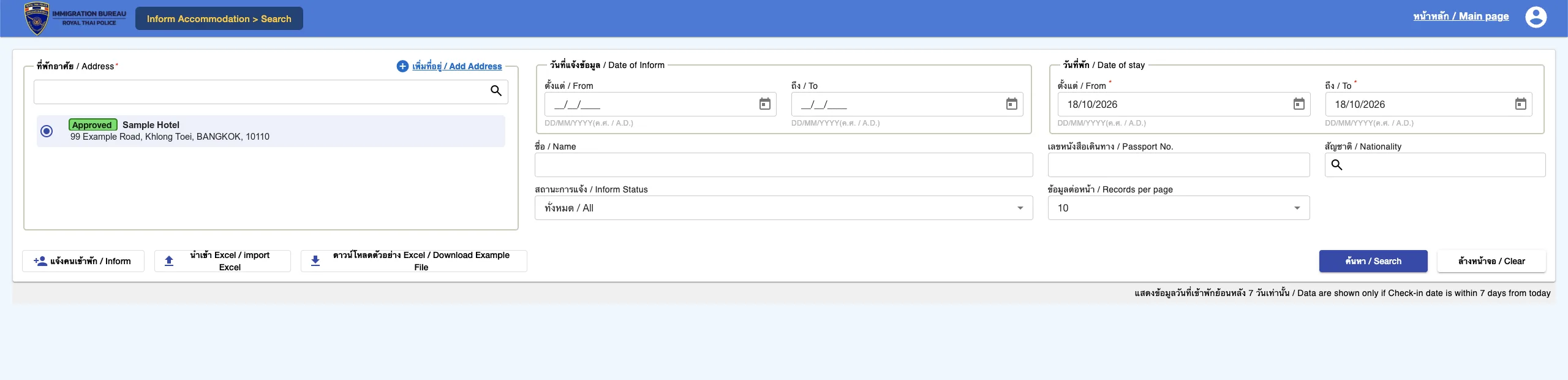
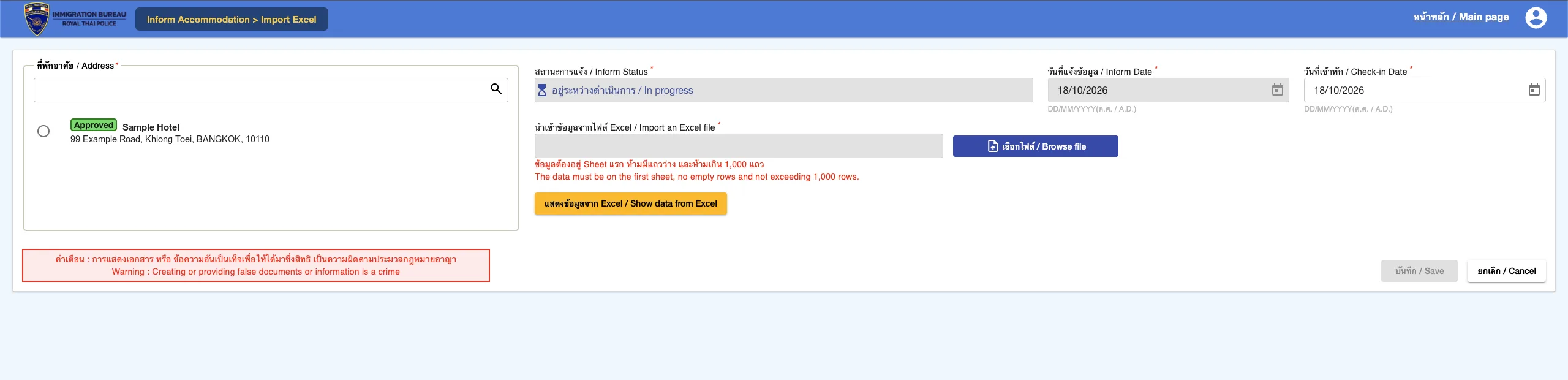
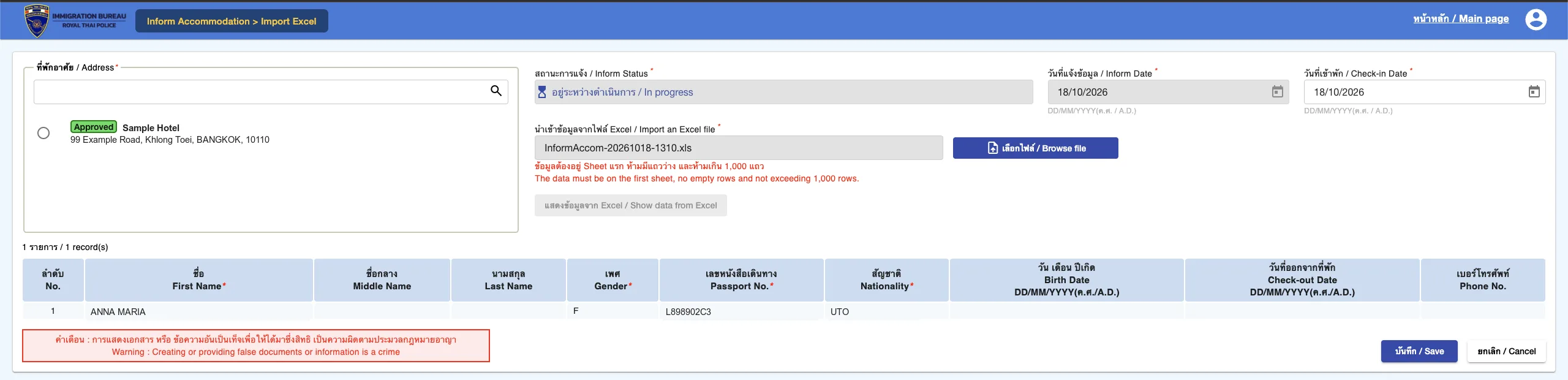
Real screenshots of the Immigration Bureau website. Property and guest details are replaced with sample data. The Immigration website may change.
Three simple steps
1. Take or choose passport photos
Use photos from a phone, a scanner or files your guests send. Add many at once, ideal for tour groups.
2. Details are read automatically
Read from the MRZ lines at the bottom of the passport, with the passport number verified by its ICAO check digit.
3. Download and file with Immigration
Get an Excel file in the Immigration accommodation template, ready to upload to the foreigner notification system.
How your guests' data stays safe
Passports are sensitive personal data, so TM30Auto is designed so images never have to leave your device.
100% processed on your device
The passport reader runs inside your browser. Images are never sent to our servers or to any other company.
Nothing is stored
We never save passport photos, names or passport numbers. Data only lives in temporary memory while you work and disappears when you close the tab.
The browser is locked against sending data out
The site sets a Content Security Policy so the browser can only talk to our server and Google Analytics, which never receives images or guest data. Our server has no way to receive images at all.
Check it yourself
Press F12 and open the Network tab while scanning. You will only see the scan counter and website visit statistics, never images or guest data.
What our server receives: a random device ID and how many scans it used today (for the free quota). For subscribers, payments are handled by Stripe. We never see your card number. If you accept, we use Google Analytics, which sets cookies to collect anonymous visit statistics (such as pages viewed, device type and country) so we can improve the site. No passport images or guest data are ever sent to Google. You can change your choice any time under “Cookie settings” at the bottom of the page, block cookies in your browser, or use the Google Analytics opt-out add-on.
From our customers
Trusted by guesthouses every day
“In high season I used to spend nearly an hour every evening typing in guests' passport details one by one. Now I snap the photos and have the TM30 file in a few minutes, and I don't have to worry about passport images being uploaded anywhere.”
“We're a small guesthouse without full-time front desk staff. TM30Auto lets us file our foreign guest reports on time from a single phone. It reads passports so accurately we hardly ever need to fix anything.”
Simple pricing, start free
Use it free every day without signing up. Upgrade when you have more foreign guests. Cancel anytime.
Pay securely with Stripe: PromptPay QR or card for one-time passes, card for automatic renewal · Cancel or change anytime
Frequently asked questions
Do I need to sign up or install anything?
No to both. Open the site and start. 5 free scans a day, reset at midnight Thailand time.
Where are passport photos sent?
Nowhere. The passport reader runs in your browser. The first time, your browser downloads the text recognition engine (about 5 MB) from this site. After that, all scanning happens on your device.
Does it submit to Immigration automatically?
Not yet. TM30Auto automates the slow part: reading each passport and filling in the Immigration Excel template. You then upload that one file to the TM30 website yourself, which takes less than a minute.
Can it misread a passport?
Accuracy depends on photo quality. Passport numbers are verified with the ICAO check digit and uncertain fields are highlighted. Always compare with the real passport before submitting.
Can I use my member code on several computers?
Yes. After paying you get a member code. Enter it with the "Member code" button at the top right on any other computer at your property.
What is the difference between one-time and automatic renewal?
A one-time payment (PromptPay QR or card) gives 30 days, or 365 days for yearly, with no repeat charges. Buy again anytime to extend from the current end date. Automatic renewal charges your card every month or year until you cancel.
How do I cancel?
Click "Member code", then "Manage subscription" to cancel, change plan or download receipts yourself at any time.
Scan your first passport free today
No sign-up, no card. Passport photos never leave your device.